| Clock - First Officer's |



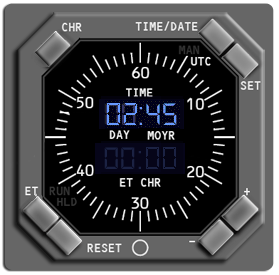
TIME/DATE Pushbutton
Controls the time/date function:
Controls the time/date function:
- Select the TIME/DATE pushbutton once to see UTC time.
- Select the TIME/DATE pushbutton again to see UTC date.
- Select the TIME/DATE pushbutton again to see manual time.
- Select the TIME/DATE pushbutton again to see manual date.
The UTC or MAN symbol is displayed on the upper right part of
the LCD display.
In MAN mode, clock time and date come from the clock. In UTC
mode, clock time and date come from the global positioning system.
the LCD display.
In MAN mode, clock time and date come from the clock. In UTC
mode, clock time and date come from the global positioning system.